Posts

Showing posts with the label Security

Basic Datacenter Design with Redundancy (Colocation Datacenter)
Image
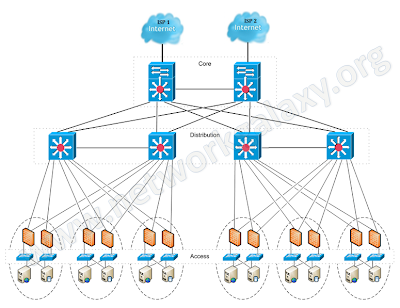
The very basic thing that an organization expects while designing its network is maximum uptime, and this maximum uptime can only be achieved when there is redundancy in the network. So in this article, we'll design a network for a company hosted in a datacenter with redundant devices and links. NOTE: The configuration of devices in this article does not include configuration for securing the control-plane of core or aggregation routers. Full Network topology:
Fortigate Backup VPN

You can configure a route-based VPN that acts as a backup facility to another VPN. It is used only while your main VPN is out of service. This is desirable when the redundant VPN uses a more expensive facility. You can configure a backup IPsec interface only in the CLI. The backup feature works only on interfaces with static addresses that have dead peer detection enabled. The monitor option creates a backup VPN for the specified phase 1 configuration. Redundant tunnels do not support Tunnel Mode or Manual Keys. You must use Interface Mode.

Cisco ASA 9.0 Network Address Translation

http://www.cisco.com/en/US/docs/security/asa/asa90/configuration/guide/nat_overview.html http://www.cisco.com/en/US/docs/security/asa/asa90/configuration/guide/asa_90_cli_config.html http://www.pcausa.com/Utilities/pcattcp.htm

Cisco ASA Active/Active Failover Configuration

Image
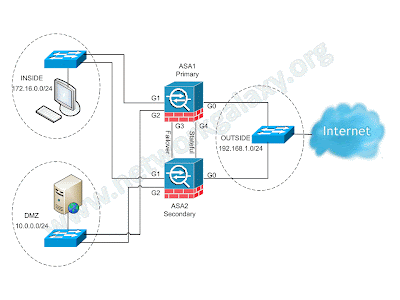
Active/Active failover is only available to security appliances in multiple context mode. In an Active/Active failover configuration, both security appliances can pass network traffic. In Active/Active failover, you divide the security contexts on the security appliance into failover groups. A failover group is simply a logical group of one or more security contexts. You can create a maximum of two failover groups on the security appliance. The admin context is always a member of failover group 1. Any unassigned security contexts are also members of failover group 1 by default. We have already seen the configuration for Active/Standby failover in the previous article. This article focuses on how to configure an Active/Active Failover configuration on ASA Security Appliance. Network Diagram  (Physical Topology)

Virtual Firewalls (Contexts)

Image
Scenario: You have worked as a network engineer for many companies, but now you have started your own collocated datacenter. At the starting, due to budget constraints, you want to be smart and decided to share a single physical firewall (Cisco ASA) between two customers i.e. Customer-A and Customer-B. Objectives: Both customers should feel that they have a separate Firewall for them. None of the Customers should be able to manage others firewall policies. Customer-A has opted for Silver plan, so allocate the resources accordingly. Customer-B has opted for Gold plan, so allocate the resources as per plan. Physical Topology

Cisco ASA Active/Standby Failover Configuration

Image
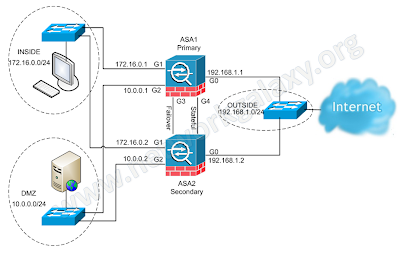
The security appliance supports two failover configurations: Active/Active Failover and Active/Standby Failover. Each failover configuration has its own method to determine and perform failover. With Active/Active Failover, both units can pass network traffic. This lets you configure load balancing on your network. Active/Active Failover is only available on units that run in multiple context mode. With Active/Standby Failover, only one unit passes traffic while the other unit waits in a standby state. If Active unit fails, secondary will take over and starts forwarding the traffic. When Secondary becomes active, it will also change it's interface IP address and mac address as well.  In Active/Standby configuration, virtually all of the configuration from the active unit is replicated to the secondary unit through a failover cable. This article focuses on how to configure an Active/Standby Failover in ASA Security Appliance. Prerequisites Hardware Requirements The two...

Remote Access VPN Configuration on Fortigate CLI

Image
In this article we will configure remote access VPN on Fortigate firewall using command line interface. We'll also look at installation and configuration of FortiClient at client end.

Virus, Worm and Trojan Horse

VIRUS some may cause only mildly annoying effects while others can damage your hardware, software or files. Almost all viruses are attached to an executable file. a virus cannot be spread without a human action, (such as running an infected program) WORM A worm is similar to a virus by design. Worms spread from computer to computer, but unlike a virus, it has the capability to travel without any human action. A worm takes advantage of file or information transport features on your system, which is what allows it to travel unaided. TROJON HORSE The Trojan horse, at first glance will appear to be useful software but will actually do damage once installed or run on your computer.  They can cause serious damage by deleting files and destroying information on your system. Trojans are also known to create backdoor on your computer that gives malicious users access to your system. Unlike viruses and worms, Trojans do not reproduce by infecting other files nor do they self-repl...

IKEv2 IPSec Remote Access VPN with Anyconnect on Cisco ASA

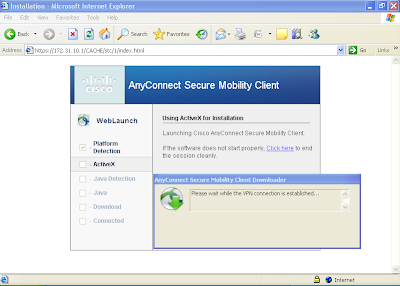
The Cisco AnyConnect Secure Mobility Solution provides a comprehensive, highly secure enterprise mobility solution. the Cisco AnyConnect Secure Mobility Solution continues to lead with next-generation security and encryption, including support for the Suite B set of cryptographic algorithms, and support for IPv6 networks. More importantly, it adapts its tunneling protocol to the most efficient method. AnyConnect client can be used to connect both SSL VPN as well as IKEv2 IPSec VPN. In this document we will see how to configure only IKEv2 IPSec VPN.

Anyconnect SSL-Client VPN with Self-signed Certificate on Cisco ASA

Image
The Cisco AnyConnect Secure Mobility Solution provides a comprehensive, highly secure enterprise mobility solution. the Cisco AnyConnect Secure Mobility Solution continues to lead with next-generation security and encryption, including support for the Suite B set of cryptographic algorithms, and support for IPv6 networks. More importantly, it adapts its tunneling protocol to the most efficient method. In the present scenario, we have to configure Anyconnect SSL remote access VPN for Sales department and Engineering department of a company. Engineering users will have to be provided with access to web server as well as FTP server, while sales users may only have access to the web server.

IKEv1 Remote Access VPN on Cisco ASA for Legacy VPN Client

Image
Even after the release of Cisco AnyConnect Secure Mobility Client which supports SSL VPN in addition to IKEv2 remote-access IPSec VPN, still out there are number of people who use legacy Cisco VPN client to connect IKEv1 remote-access IPSec VPN. In the present scenario, we have to configure IKEv1 remote access VPN for Sales department and Engineering department of a company. Engineering users will have to be provided with access to web server as well as FTP server, while sales users may only have access to the web server.

Configuring Cisco ASA as a DNS Client

To be able to ping or perform any operation based on FQDN, ASA needs to be configured as a DNS client so that it can resolve names. It can also be also useful for WebVPN. If the ASA can resolve FQDNs, then only the WebVPN clients can browse FQDN URLs. dns domain-lookup INSIDE DNS server-group DefaultDNS     name-server 192.168.100.10     domain-name pacificgroup.co.in

Clientless SSL VPN (webvpn) configuration on Cisco ASA

Image
Clientless VPN is useful when  remote users want to establish secure connection to the corporate office, but don't have administrative rights to the PC. WebVPN provides remote access connectivity from almost any Internet-enabled location using a Web browser and its native SSL/TLS encryption. It is best to use ASDM for configuration of WebVPN because it provides much more features and customizations that are not available from CLI. But basic WebVPN can be configured easily from the Command Line Interface. In the present scenario, we have to configure WebVPN for Sales department and Engineering department of a company. Engineering users will have to be provided with access to webserver as well as FTP server, while sales users may only have access to the webserver.

How TLS works / TLS Handshake Protocol

Image
Transport Layer Security (TLS) and it's predecessor, Secure Sockets Layer (SSL), are cryptographic protocols that provide communication security over the Internet. They use asymmetric cryptography for authentication of key exchange, symmetric encryption for confidentiality and message authentication codes for message integrity. Once the client and server have decided to use TLS, they negotiate a stateful connection by using a handshaking procedure. During this handshake, the client and server agree on various parameters used to establish the connection's security. The TLS Handshake Protocol involves the following steps: The client sends a "Client hello" message to the server, along with the client's random value and supported cipher suites.

Understanding IPSec VPN

The Internet Security Association and Key Management Protocol, also called IKE, is the negotiation protocol that lets two hosts agree on how to build an IPSec Security Association. Each ISAKMP negotiation is divided into two sections called Phase1 and Phase2. Phase 1 creates the first tunnel to protect later ISAKMP negotiation messages. Phase 2 creates the tunnel that protects data travelling across the secure connection.

IKEv2 IPsec Site-to-Site VPN configuration on Cisco ASA 8.4(x)

Image
Though the crypto IKEv2 proposal command looks similar to the IKEv1 crypto isakmp policy command, there are many differences in how IKEv2 negotiates. Unlike IKEv1, the authentication method and SA lifetime are not negotiable in IKEv2, and they cannot be configured in the IKEv2 proposal. Also the IKEv2 proposal configuration supports specifying multiple options for each transform type and we can configure different pre-shared-key for local and remote authentication. Pseudo-Random Function (PRF) algorithm  is the same as the integrity algorithm, and hence, it is not configured separately. Our goal is to configure site-to-site or l2l IKEv2 IPsec VPN between ASA1 and ASA2 which are running IOS 8.4(2). IP addressing scheme is mentioned in the network diagram.

IPsec VPN as a Backup for Point-to-Point Link using IP SLA

Image
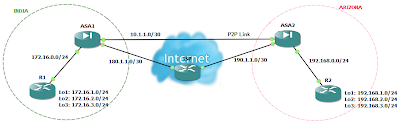
There may be times when you wish to access your remote site even when the point-to-point link (lease line) to that site is down. This is possible if you have also an internet connection to that site. You can configure an IPsec VPN between both the sites. But the problem is that even if you configure IPsec VPN on both the locations, the VPN will never come up when the point-to-point connection goes down. This is because even though that point-to-point connection is down, the interface status of firewall will always remain up due to devices of ISP in between and thus the static route will not let the incoming traffic to match the interesting traffic for IPsec VPN. So the solution to this problem is either to configure dynamic routing protocols or IP SLA. Cisco IP SLA monitor can be used to track the reachability of other location. Here is an example of such scenario using Cisco IP SLA monitor. If you need the gns3 lab for this or have any queries, you can leave your queries and email ID...

IKEv1 IPsec Site-to-Site VPN configuration on Cisco ASA 8.4(x)

Image
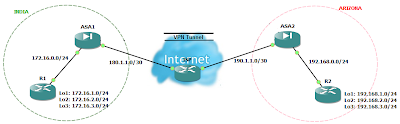
IPsec Site-to-Site VPN are good alternative to a point-to-point lease lines when cost matters. Our goal is to configure site-to-site or l2l IPsec VPN between ASA1 and ASA2 which are running IOS 8.4(2). IP addressing scheme is mentioned in the network diagram.