Posts

Showing posts with the label VPN

Creating MPLS Layer 3 VPN

Image
When used with MPLS, the VPN feature allows several sites to interconnect transparently through a service provider's network. One service provider network can support several different IP VPNs. Each of these appears to its users as a private network, separate from all other networks. Within a VPN, each site can send IP packets to any other site in the same VPN. Each VPN is associated with one or more VPN routing and forwarding instances (VRFs). A VRF consists of an IP routing table, a derived Cisco express forwarding (CEF) table, and a set of interfaces that use this forwarding table. The router maintains a separate routing and CEF table for each VRF. This prevents information being sent outside the VPN and allows the same subnet to be used in several VPNs without causing duplicate IP address problems. In this document, we'll be configuring basic MPLS Layer 3 VPN for two customers, each having two physical sites at different location. Network Topology: ...

Fortigate Backup VPN

You can configure a route-based VPN that acts as a backup facility to another VPN. It is used only while your main VPN is out of service. This is desirable when the redundant VPN uses a more expensive facility. You can configure a backup IPsec interface only in the CLI. The backup feature works only on interfaces with static addresses that have dead peer detection enabled. The monitor option creates a backup VPN for the specified phase 1 configuration. Redundant tunnels do not support Tunnel Mode or Manual Keys. You must use Interface Mode.

Remote Access VPN Configuration on Fortigate CLI

Image
In this article we will configure remote access VPN on Fortigate firewall using command line interface. We'll also look at installation and configuration of FortiClient at client end.

IKEv2 IPSec Remote Access VPN with Anyconnect on Cisco ASA

The Cisco AnyConnect Secure Mobility Solution provides a comprehensive, highly secure enterprise mobility solution. the Cisco AnyConnect Secure Mobility Solution continues to lead with next-generation security and encryption, including support for the Suite B set of cryptographic algorithms, and support for IPv6 networks. More importantly, it adapts its tunneling protocol to the most efficient method. AnyConnect client can be used to connect both SSL VPN as well as IKEv2 IPSec VPN. In this document we will see how to configure only IKEv2 IPSec VPN.

Anyconnect SSL-Client VPN with Self-signed Certificate on Cisco ASA

Image
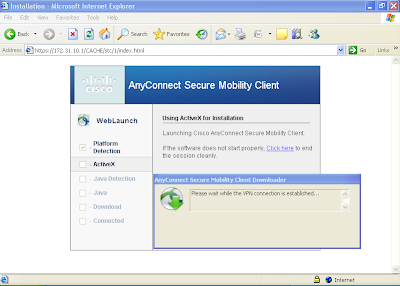
The Cisco AnyConnect Secure Mobility Solution provides a comprehensive, highly secure enterprise mobility solution. the Cisco AnyConnect Secure Mobility Solution continues to lead with next-generation security and encryption, including support for the Suite B set of cryptographic algorithms, and support for IPv6 networks. More importantly, it adapts its tunneling protocol to the most efficient method. In the present scenario, we have to configure Anyconnect SSL remote access VPN for Sales department and Engineering department of a company. Engineering users will have to be provided with access to web server as well as FTP server, while sales users may only have access to the web server.

IKEv1 Remote Access VPN on Cisco ASA for Legacy VPN Client

Image
Even after the release of Cisco AnyConnect Secure Mobility Client which supports SSL VPN in addition to IKEv2 remote-access IPSec VPN, still out there are number of people who use legacy Cisco VPN client to connect IKEv1 remote-access IPSec VPN. In the present scenario, we have to configure IKEv1 remote access VPN for Sales department and Engineering department of a company. Engineering users will have to be provided with access to web server as well as FTP server, while sales users may only have access to the web server.

Clientless SSL VPN (webvpn) configuration on Cisco ASA

Image
Clientless VPN is useful when  remote users want to establish secure connection to the corporate office, but don't have administrative rights to the PC. WebVPN provides remote access connectivity from almost any Internet-enabled location using a Web browser and its native SSL/TLS encryption. It is best to use ASDM for configuration of WebVPN because it provides much more features and customizations that are not available from CLI. But basic WebVPN can be configured easily from the Command Line Interface. In the present scenario, we have to configure WebVPN for Sales department and Engineering department of a company. Engineering users will have to be provided with access to webserver as well as FTP server, while sales users may only have access to the webserver.

Understanding IPSec VPN

The Internet Security Association and Key Management Protocol, also called IKE, is the negotiation protocol that lets two hosts agree on how to build an IPSec Security Association. Each ISAKMP negotiation is divided into two sections called Phase1 and Phase2. Phase 1 creates the first tunnel to protect later ISAKMP negotiation messages. Phase 2 creates the tunnel that protects data travelling across the secure connection.

IKEv2 IPsec Site-to-Site VPN configuration on Cisco ASA 8.4(x)

Image
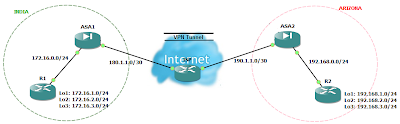
Though the crypto IKEv2 proposal command looks similar to the IKEv1 crypto isakmp policy command, there are many differences in how IKEv2 negotiates. Unlike IKEv1, the authentication method and SA lifetime are not negotiable in IKEv2, and they cannot be configured in the IKEv2 proposal. Also the IKEv2 proposal configuration supports specifying multiple options for each transform type and we can configure different pre-shared-key for local and remote authentication. Pseudo-Random Function (PRF) algorithm  is the same as the integrity algorithm, and hence, it is not configured separately. Our goal is to configure site-to-site or l2l IKEv2 IPsec VPN between ASA1 and ASA2 which are running IOS 8.4(2). IP addressing scheme is mentioned in the network diagram.

IPsec VPN as a Backup for Point-to-Point Link using IP SLA

Image
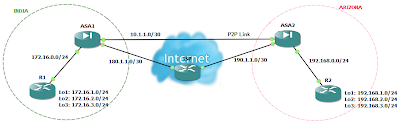
There may be times when you wish to access your remote site even when the point-to-point link (lease line) to that site is down. This is possible if you have also an internet connection to that site. You can configure an IPsec VPN between both the sites. But the problem is that even if you configure IPsec VPN on both the locations, the VPN will never come up when the point-to-point connection goes down. This is because even though that point-to-point connection is down, the interface status of firewall will always remain up due to devices of ISP in between and thus the static route will not let the incoming traffic to match the interesting traffic for IPsec VPN. So the solution to this problem is either to configure dynamic routing protocols or IP SLA. Cisco IP SLA monitor can be used to track the reachability of other location. Here is an example of such scenario using Cisco IP SLA monitor. If you need the gns3 lab for this or have any queries, you can leave your queries and email ID...

IKEv1 IPsec Site-to-Site VPN configuration on Cisco ASA 8.4(x)

Image
IPsec Site-to-Site VPN are good alternative to a point-to-point lease lines when cost matters. Our goal is to configure site-to-site or l2l IPsec VPN between ASA1 and ASA2 which are running IOS 8.4(2). IP addressing scheme is mentioned in the network diagram.