Posts

Showing posts with the label Redundancy

Basic Datacenter Design with Redundancy (Colocation Datacenter)
Image
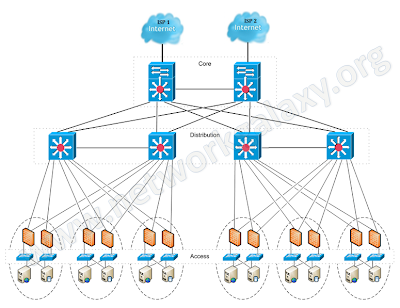
The very basic thing that an organization expects while designing its network is maximum uptime, and this maximum uptime can only be achieved when there is redundancy in the network. So in this article, we'll design a network for a company hosted in a datacenter with redundant devices and links. NOTE: The configuration of devices in this article does not include configuration for securing the control-plane of core or aggregation routers. Full Network topology:
Managing Standby Unit from the Terminal of Primary Firewall when they are in HA

Fortigate execute ha manage 0 where the 0 is serial no of the secondary device. execute ha manage <id>    please input peer box index. <0>     Subsidary unit FGT80C3912608121 NINMUM03-DB-PRI-~ # execute ha manage <id>    please input peer box index. <0>     Subsidary unit FGT80C3912608121 Cisco

Cisco ASA Active/Active Failover Configuration

Image
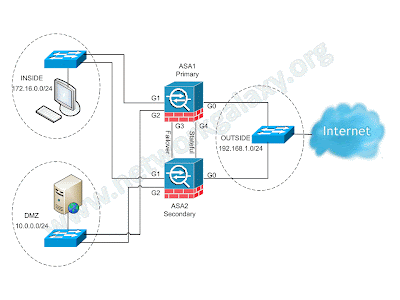
Active/Active failover is only available to security appliances in multiple context mode. In an Active/Active failover configuration, both security appliances can pass network traffic. In Active/Active failover, you divide the security contexts on the security appliance into failover groups. A failover group is simply a logical group of one or more security contexts. You can create a maximum of two failover groups on the security appliance. The admin context is always a member of failover group 1. Any unassigned security contexts are also members of failover group 1 by default. We have already seen the configuration for Active/Standby failover in the previous article. This article focuses on how to configure an Active/Active Failover configuration on ASA Security Appliance. Network Diagram  (Physical Topology)

Cisco ASA Active/Standby Failover Configuration

Image
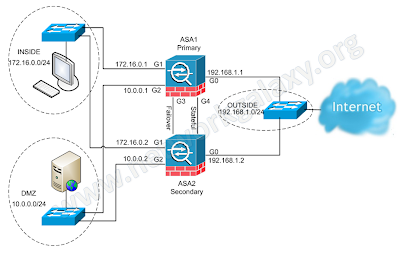
The security appliance supports two failover configurations: Active/Active Failover and Active/Standby Failover. Each failover configuration has its own method to determine and perform failover. With Active/Active Failover, both units can pass network traffic. This lets you configure load balancing on your network. Active/Active Failover is only available on units that run in multiple context mode. With Active/Standby Failover, only one unit passes traffic while the other unit waits in a standby state. If Active unit fails, secondary will take over and starts forwarding the traffic. When Secondary becomes active, it will also change it's interface IP address and mac address as well.  In Active/Standby configuration, virtually all of the configuration from the active unit is replicated to the secondary unit through a failover cable. This article focuses on how to configure an Active/Standby Failover in ASA Security Appliance. Prerequisites Hardware Requirements The two...

IPsec VPN as a Backup for Point-to-Point Link using IP SLA

Image
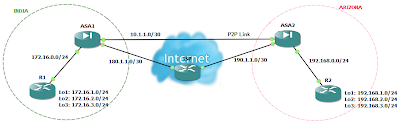
There may be times when you wish to access your remote site even when the point-to-point link (lease line) to that site is down. This is possible if you have also an internet connection to that site. You can configure an IPsec VPN between both the sites. But the problem is that even if you configure IPsec VPN on both the locations, the VPN will never come up when the point-to-point connection goes down. This is because even though that point-to-point connection is down, the interface status of firewall will always remain up due to devices of ISP in between and thus the static route will not let the incoming traffic to match the interesting traffic for IPsec VPN. So the solution to this problem is either to configure dynamic routing protocols or IP SLA. Cisco IP SLA monitor can be used to track the reachability of other location. Here is an example of such scenario using Cisco IP SLA monitor. If you need the gns3 lab for this or have any queries, you can leave your queries and email ID...