Posts

Cisco ASA Active/Standby Failover Configuration
Image
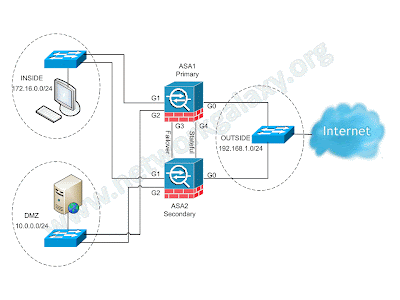
The security appliance supports two failover configurations: Active/Active Failover and Active/Standby Failover. Each failover configuration has its own method to determine and perform failover. With Active/Active Failover, both units can pass network traffic. This lets you configure load balancing on your network. Active/Active Failover is only available on units that run in multiple context mode. With Active/Standby Failover, only one unit passes traffic while the other unit waits in a standby state. If Active unit fails, secondary will take over and starts forwarding the traffic. When Secondary becomes active, it will also change it's interface IP address and mac address as well.  In Active/Standby configuration, virtually all of the configuration from the active unit is replicated to the secondary unit through a failover cable. This article focuses on how to configure an Active/Standby Failover in ASA Security Appliance. Prerequisites Hardware Requirements The two...

Remote Access VPN Configuration on Fortigate CLI

Image
In this article we will configure remote access VPN on Fortigate firewall using command line interface. We'll also look at installation and configuration of FortiClient at client end.

Enhanced Interior Gateway Routing Protocol (EIGRP)

Image
Enhanced Interior Gateway Routing Protocol (EIGRP) is an Open standard routing protocol loosely based on their original IGRP created by Cisco. Most of the routing optimizations are based on Diffuse Update Algorithm (DUAL), which guarantees loop-free operation and provide a mechanism for fast convergence. EIGRP has following features: Simple configuration Flexibility in summarization Unequal cost load balancing Scalability Authentication VLSM support Keeps Backup routes Incremental updates EIGRP is the only routing protocol which keeps backup routes in its topology table. So when the primary route fails, it pick that backup route from the topology table and puts it into the routing table, eliminating the need of querying a new route from neighbors on failure on primary link, which results in fast convergence.

Virus, Worm and Trojan Horse

VIRUS some may cause only mildly annoying effects while others can damage your hardware, software or files. Almost all viruses are attached to an executable file. a virus cannot be spread without a human action, (such as running an infected program) WORM A worm is similar to a virus by design. Worms spread from computer to computer, but unlike a virus, it has the capability to travel without any human action. A worm takes advantage of file or information transport features on your system, which is what allows it to travel unaided. TROJON HORSE The Trojan horse, at first glance will appear to be useful software but will actually do damage once installed or run on your computer.  They can cause serious damage by deleting files and destroying information on your system. Trojans are also known to create backdoor on your computer that gives malicious users access to your system. Unlike viruses and worms, Trojans do not reproduce by infecting other files nor do they self-repl...

Default Administrative Distances

Default Administrative Distances (AD Values) Route Source Default Distance Connected interface 0 Static route 1 EIGRP summary route 5 External BGP 20 Internal EIGRP 90 IGRP 100 Open Shortest Path First (OSPF) 110 Intermediate System-to-Intermediate System (IS-IS) 115 Routing Information Protocol (RIP) 120 Exterior Gateway Protocol (EGP) 140 EIGRP external route 170 Internal Border Gateway Protocol (BGP) 200 Unknown 255 To display the default administrative distance for a specified routing process, use the show ip protocols EXEC command.

Cisco Router as a Frame Relay Switch

BGP Confederation

Image
The implementation of BGP Confederations reduces the iBGP mesh inside an AS. The trick is to divide an AS into multiple ASs and assign the whole group to a single confederation. Each AS alone has iBGP fully meshed and has connections to other ASs inside the confederation. Even though these ASs have eBGP peers to ASs within the confederations, the ASs exchange routing as if they used iBGP. In this way, the confederation preserves next hop, metric, and local preference information. To the outside world, the confederation appears to be a single AS. In order to configure a BGP confederation, issue this command: bgp confederation identifier autonomous-system The confederation identifier is the AS number of the confederation group. The execution of this command performs peering between multiple ASs within the confederation: bgp confederation peers autonomous-system [autonomous-system] Here is an example of confederation: Confederation

BGP Route Reflectors

Image
Rules says that, routes learned via iBGP will never be advertised to another iBGP peer in normal conditions. One way to overcome this rule is to create a full mesh topology among iBGP peers. But in some conditions this is not feasible due to many reasons. So an alternative to BGP full mesh topology is Route Reflectors, which allows a router to advertise, or reflect, iBGP learned routes to other iBGP speakers. This route reflection reduces the number of iBGP peers within an AS. In normal cases, maintain a full iBGP mesh among RTA, RTB and RTC within AS 100. If you utilize the RR concept, RTC can be elected as an RR. In this way, RTC has a partial iBGP peering with RTA and RTB. Peering between RTA and RTB is not necessary because RTC is an RR for the updates that come from RTA and RTB. neighbor A.B.C.D route-reflector-client

Open Shortest Path First (OSPF)

Image
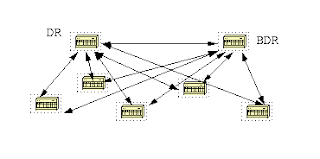
The Open Shortest Path First (OSPF) is an Interior Gateway Protocol used to distribute routing information within a single Autonomous System. OSPF is a Link State routing protocol and has following features. Fast convergence VLSM support Scalable to large networks Stub capabilities Authenticaion Efficiency (Sends only hello messages to maintain neighbor relationship) Route tagging capabilities Uses multicast for routing updates. Specifications                              Protocol type            Link-state               Administrative Distance            110                                          Metric          ...

OSPF Neighbor States

When OSPF adjacency is formed, a router goes through several state changes before it becomes fully adjacent with its neighbor. Those states are defined below: Down This is the first OSPF neighbor state. It means that no hellos have been received from this neighbor, but hello packets can still be sent to the neighbor in this state. Attempt This state is only  valid for manually configured neighbors in an NBMA environment. In Attempt state, the router sends unicast hello packets every poll interval to the neighbor, from which hellos have not been received within the dead interval.

OSPF Stub and NSSA configuration

Image
Scenario: You have been hired as a Network Engineer in an International Chemical Company. They have been running OSPF for very long time.  External routes are redistributed on router R1 which are propagating all through the OSPF domain. Recently they have done partnership with one of the Local Export company which run RIP in their Network. Objectives: For efficiency, configure area 50 as a Stub. Redistribute RIP routes on R4 into OSPF domain. Configure area 50 as a nssa. Make sure that the area 50 can reach the External routes redistributed through Backbone ASBR. Topology :

OSPF Special Areas

To understand the OSPF Area types, first let's have a breif review of OSPF LSA types. For deep understanding of LSA types, visit  Understanding OSPF Link-state Advertisement . Routers generate different types of LSAs depending on the router's role within the OSPF Autonomous Systesm. LSA type 1 (Router LSA) Generated by all routers in an area to describe their directly attached links (Intra-area routes). These LSAs do not leave the area. LSA type 2 (Network LSA) Generated by the DR of a segment to describe the neighbors connected to the segment. These LSAs do not leave the area.

BGP Route Refresh and Soft-Reconfiguration for Inbound Policy Update

Image
Whenever there is a change in routing policy, the BGP session must be reset (cleared) for the new policy to take effect and the routing table  to be configured. Using a hard reset to clear a BGP session causes cache invalidation and results in a negative impact on network. We can use the following three methods to reset the BGP session: Hard reset : dropping and re-establishing TCP session to our peers. Dynamic Soft reset : uses the route-refresh capability to request all NLRI be sent again. Soft reset using stored information : uses the unmodified and unfiltered stored updates.

Filtering Routes in BGP using Route-maps and Prefix-list

Image
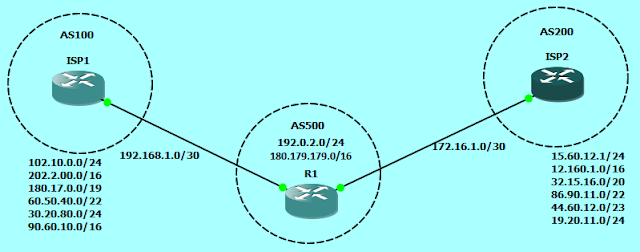
Order of preference of attributes in BGP The order of preference varies based on whether the attributes are applied for inbound updates or outbound updates. For inbound updates the order of preference is:     route-map     filter-list     prefix-list, distribute-list For outbound updates the order of preference is:     prefix-list, distribute-list     filter-list     route-map NOTE: The attributes prefix-list and distribute-list are mutually exclusive, and only one command (neighbor distribute-list or neighbor prefix-list) can be applied to each inbound or outbound direction for a particular neighbor. Scenario: We own the AS500 and advertising a network block of 192.0.2.0/24 and 180.179.179.0/16 to two different ISPs.

Border Gateway Protocol (BGP)

Image
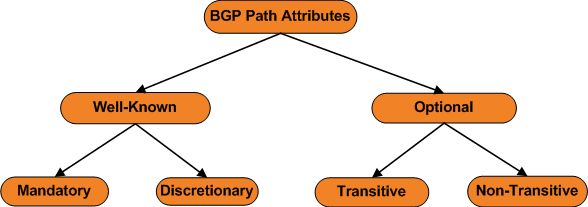
Introduction Border Gateway Protocol is an Exterior Gateway Protocol (EGP) used for routing between the autonomous systems. It is the protocol which is used to to make core routing decisions on the internet. BGP has two flavours, eBGP and iBGP. eBGP is routing between the autonomous systems and iBGP is routing within an autonomous systems. BGP is a path-vector routing protocol and has following features: Reliable updaes (TCP -based, port 179) Triggered updates only Rich metric Scalable to massive networks   Specifications              Protocol Type                Path-vector                    eBGP AD                20                     iBGP AD                200           ...

Distance-Vector, Link-State and Path-Vector

Distance-Vector Routing Protocol A distance-vector routing protocol requires that a router inform its neighbors of topology change periodically.  Routers running Distance-vector routing protocols knows only what his neighbors tells him. They do not have knoledge of the entire path to a destination. Instead they use two methods:               • Direction in which router or exit interface a packet should be forwarded.              • Distance from its destination. Distance-vector routing protocols have less computational complexity and message overhead. Protocols: RIP

IKEv2 IPSec Remote Access VPN with Anyconnect on Cisco ASA

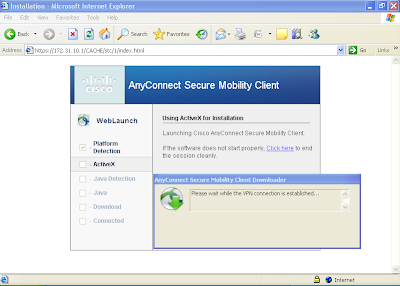
The Cisco AnyConnect Secure Mobility Solution provides a comprehensive, highly secure enterprise mobility solution. the Cisco AnyConnect Secure Mobility Solution continues to lead with next-generation security and encryption, including support for the Suite B set of cryptographic algorithms, and support for IPv6 networks. More importantly, it adapts its tunneling protocol to the most efficient method. AnyConnect client can be used to connect both SSL VPN as well as IKEv2 IPSec VPN. In this document we will see how to configure only IKEv2 IPSec VPN.

Understanding OSPF Link-state Advertisement

Image
LSA Overview Routers generate different types of LSAs depending on the router's role within the OSPF Autonomous System. All OSPF  routers create Router LSAs (Type-1) Designated routers create Network LSAs (Type-2) Area-Border routers create Summary LSAs (Type-3) Area Border routers create ASBR-Summary LSAs (Type-4) when an ASBR is known. Autonomous-System Boundary routers create External LSAs (Type-5 and Type-7)

Anyconnect SSL-Client VPN with Self-signed Certificate on Cisco ASA

Image
The Cisco AnyConnect Secure Mobility Solution provides a comprehensive, highly secure enterprise mobility solution. the Cisco AnyConnect Secure Mobility Solution continues to lead with next-generation security and encryption, including support for the Suite B set of cryptographic algorithms, and support for IPv6 networks. More importantly, it adapts its tunneling protocol to the most efficient method. In the present scenario, we have to configure Anyconnect SSL remote access VPN for Sales department and Engineering department of a company. Engineering users will have to be provided with access to web server as well as FTP server, while sales users may only have access to the web server.

Reserved Numbers for Documentation/Special Use by IANA

Have you ever been in a situation when you are preparing some educational study material to publish on internet and stuck on thinking of what Public IP address to use, then here is a solution for that situation. The blocks 192.0.2.0/24 (TEST-NET-1), 198.51.100.0/24 (TEST-NET-2), and 203.0.113.0/24 (TEST-NET-3) are provided for use in documentation. The given above address blocks are set aside for teaching and learning purposes. These addresses can be used in documentation and network examples. Unlike the experimental addresses, network devices will accept these addresses in their configurations. You may often find these addresses used with the domain names example.com or example.net in RFCs, vendor, and protocol documentation. Addresses within this block should not appear on the Internet. More information about Special-Use IPv4 addresses can be obtained from the RFC5735 . Reserved Autonomous System (AS) Number 16-bit AS number: 64496 - 64511 32-bit AS number: 65536 - 655...

Download Visio Stencils for Network Topology

Microsoft Visio is a great way to draft network diagrams for documentation, and network diagrams looks more nice if correct icons are used for the devices. So, download the Visio stencils from the following link. If you have more such links, you can post them in comments and they will be added here. http://www.cisco.com/en/US/products/hw/prod_cat_visios.html http://www.cisco.com/web/about/ac50/ac47/2.html

NetFlow to Monitor Network Traffic

Image
NetFlow is a network protocol developed by Cisco Systems for collecting IP traffic information. NetFlow has become an industry standard for traffic monitoring and is supported on various platforms. Routers or switches that support NetFlow  can collect IP traffic statistics on all interfaces where NetFlow is enabled, and later export those statistics as NetFlow records, towards at least one NetFlow collector. Network Flows   A network flow can be defined in many ways. Cisco standard NetFlow defines a flow as a unidirectional sequence of packets that all share the following 7 values.

Prevent Screensaver and PC Locking

Image
There may be certain times when you want your system not to lock if its been idle for few minutes. By default Windows operating system has this functionality to fulfill your needs, but it also can't help if those functionalists or options are restricted by corporate policies, for example locking the system and displaying screensaver is very common in companies if  the system is idle for a predefined time. Here is a small utility that can help you out and prevent the system from automatically locking. NoSleep.exe is an executable file which prevents screensaver and PC locking. You can download it and run from your desktop, no installation needed.

IKEv1 Remote Access VPN on Cisco ASA for Legacy VPN Client

Image
Even after the release of Cisco AnyConnect Secure Mobility Client which supports SSL VPN in addition to IKEv2 remote-access IPSec VPN, still out there are number of people who use legacy Cisco VPN client to connect IKEv1 remote-access IPSec VPN. In the present scenario, we have to configure IKEv1 remote access VPN for Sales department and Engineering department of a company. Engineering users will have to be provided with access to web server as well as FTP server, while sales users may only have access to the web server.

Configuring Cisco ASA as a DNS Client

To be able to ping or perform any operation based on FQDN, ASA needs to be configured as a DNS client so that it can resolve names. It can also be also useful for WebVPN. If the ASA can resolve FQDNs, then only the WebVPN clients can browse FQDN URLs. dns domain-lookup INSIDE DNS server-group DefaultDNS     name-server 192.168.100.10     domain-name pacificgroup.co.in

Clientless SSL VPN (webvpn) configuration on Cisco ASA

Image
Clientless VPN is useful when  remote users want to establish secure connection to the corporate office, but don't have administrative rights to the PC. WebVPN provides remote access connectivity from almost any Internet-enabled location using a Web browser and its native SSL/TLS encryption. It is best to use ASDM for configuration of WebVPN because it provides much more features and customizations that are not available from CLI. But basic WebVPN can be configured easily from the Command Line Interface. In the present scenario, we have to configure WebVPN for Sales department and Engineering department of a company. Engineering users will have to be provided with access to webserver as well as FTP server, while sales users may only have access to the webserver.

How TLS works / TLS Handshake Protocol

Image
Transport Layer Security (TLS) and it's predecessor, Secure Sockets Layer (SSL), are cryptographic protocols that provide communication security over the Internet. They use asymmetric cryptography for authentication of key exchange, symmetric encryption for confidentiality and message authentication codes for message integrity. Once the client and server have decided to use TLS, they negotiate a stateful connection by using a handshaking procedure. During this handshake, the client and server agree on various parameters used to establish the connection's security. The TLS Handshake Protocol involves the following steps: The client sends a "Client hello" message to the server, along with the client's random value and supported cipher suites.

Understanding IPSec VPN

The Internet Security Association and Key Management Protocol, also called IKE, is the negotiation protocol that lets two hosts agree on how to build an IPSec Security Association. Each ISAKMP negotiation is divided into two sections called Phase1 and Phase2. Phase 1 creates the first tunnel to protect later ISAKMP negotiation messages. Phase 2 creates the tunnel that protects data travelling across the secure connection.

Configure Local Certification Authority on Windows Server 2003

Image
Now you have configured a IPSec VPN or SSL VPN for your company employees and want to authenticate using Digital Certificates. You have an option that you can go to any Public Certification Authorities like Verisign or godaddy to get digital certificates, for which you will be charged money. Another option is to configure a Windows Server 2003 as a Certificate Server and issue certificates from that server. Also you can install the public key of the Certificate server to the client's PCs, so that their browser don't show warning while accessing the URL. Here is how you can configure Local Certificate Authority on Windows Server 2003.

IKEv2 IPsec Site-to-Site VPN configuration on Cisco ASA 8.4(x)

Image
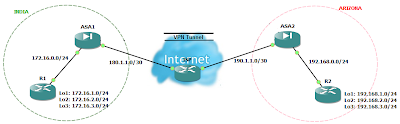
Though the crypto IKEv2 proposal command looks similar to the IKEv1 crypto isakmp policy command, there are many differences in how IKEv2 negotiates. Unlike IKEv1, the authentication method and SA lifetime are not negotiable in IKEv2, and they cannot be configured in the IKEv2 proposal. Also the IKEv2 proposal configuration supports specifying multiple options for each transform type and we can configure different pre-shared-key for local and remote authentication. Pseudo-Random Function (PRF) algorithm  is the same as the integrity algorithm, and hence, it is not configured separately. Our goal is to configure site-to-site or l2l IKEv2 IPsec VPN between ASA1 and ASA2 which are running IOS 8.4(2). IP addressing scheme is mentioned in the network diagram.

IPsec VPN as a Backup for Point-to-Point Link using IP SLA

Image
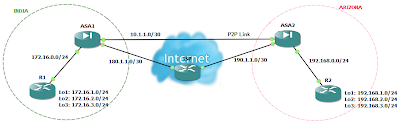
There may be times when you wish to access your remote site even when the point-to-point link (lease line) to that site is down. This is possible if you have also an internet connection to that site. You can configure an IPsec VPN between both the sites. But the problem is that even if you configure IPsec VPN on both the locations, the VPN will never come up when the point-to-point connection goes down. This is because even though that point-to-point connection is down, the interface status of firewall will always remain up due to devices of ISP in between and thus the static route will not let the incoming traffic to match the interesting traffic for IPsec VPN. So the solution to this problem is either to configure dynamic routing protocols or IP SLA. Cisco IP SLA monitor can be used to track the reachability of other location. Here is an example of such scenario using Cisco IP SLA monitor. If you need the gns3 lab for this or have any queries, you can leave your queries and email ID...

IKEv1 IPsec Site-to-Site VPN configuration on Cisco ASA 8.4(x)

Image
IPsec Site-to-Site VPN are good alternative to a point-to-point lease lines when cost matters. Our goal is to configure site-to-site or l2l IPsec VPN between ASA1 and ASA2 which are running IOS 8.4(2). IP addressing scheme is mentioned in the network diagram.

Bypassing Proxy Server in Google Chrome

Image
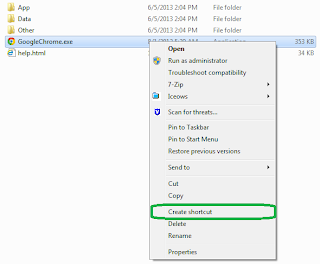
There may be times when you might want to use Google Chrome and do not wish to use the proxy settings for which you are bound to use in Internet Explorer because of your company policies. If you try to change proxy settings in Google Chrome, by default it will open the System Internet Properties dialogue box, and most of the times, change in proxy setting options is restricted by domain group policy. So here is an alternate way to remove or disable proxy settings in Google Chrome.

List of Public Route Servers (Looking Glass)

Route servers are setup by ISP's and backbone carriers to display information about networks running the BGP protocol. Route servers can be useful for network administrators to see the routes advertised from their network. The route server simply gives the ability to look at an IP routing table of an autonomous system where the server is located. You can also use these looking glass for some troubleshooting purpose like ip bgp, ping and traceroute to see which path is taken by the ISPs across the globe to reach their network. Here is a list of some route servers. http://lg.teleglobe.net/lg  (TATA Communications) https://lg.airtel.in (BHARTI Airtel) http://203.190.131.164/lg (NIXI) http://ubs.flagtel.com/lg  (Reliance) http://lg.vodafone.is/  (Vodafone) http://routeserver.org http://www.bgp4.as/looking-glasses http://www.netdigix.com/servers.html https://www.sprint.net/lg/lg_start.php http://bgp.he.net/ http://routeviews.org/ BGP troubleshooting Tools: ...

Personalize your mobile phone with Cisco Ringtones

If you are also one of those who like Cisco stuffs everywhere, this post might interest you. Just download one of the following MP3 ringtones to your computer and transfer to your phone. Cisco Acoustic Ringtone (468K - MP3) Cisco Human Ringtone (708K - MP3) Cisco Standard Ringtone (568 - MP3) Cisco Symphony Ringtone (761K - MP3) Cisco Synthesizer Ringtone (234K - MP3) Cisco Techno Ringtone (566K - MP3)

Checking IP Address in Fortigate Geography-based Filter list

If you have a website and want to restrict it's access only to some specific countries, Fortinet's geography-based filtering would be very handy in that situation. The geographic-based addresses allow you to indicate the country, and the traffic originating or going to this country is logged, blocked or specific filtering is applied. But there will also be a situation when you might want to know if specific subnet is included in a country list or not. The following handy command will help you in that situation.

BGP Best Path Selection

Border Gateway Protocol (BGP) routers typically receive multiple paths to the same destination. The BGP best path algorithm decides which is the best path to install in the IP routing table and to use for traffic forwarding. The best route selection criteria occurs in the following order: Exclude any route with inaccessible next hop Prefer the path with the highest weight (local to router, Cisco-proprietary parameter) Prefer the path with the highest Local Preferance. (global within autonomous system) Prefer the path that was locally originated. (including redistributed routers from IGP) Prefer the path with the shortest AS_PATH (compare length only) Prefer the path with the lowest origin type (IGP < EGP < Incomplete) Prefer the path with the lowest multi-exit discriminator (MED) Prefer eBGP over iBGP paths. Prefer the path whose next-hop address has the lowest IGP metric Multipath determination For external BGP (eBGP) paths, prefer the oldest path Prefer pa...

Open Systems Interconnection (OSI) model

The Open Systems Interconnection (OSI) model has seven layers. The layers are stacked this way. Physical Data Link Network Transport Session Presentation Application PHYSICAL LAYER The Physical layer, the lowest layer of the OSI model, is concerned with the transmission and reception of the unstructured raw bit stream over a physical medium. It defines the type of signal, i.e. electrical, optical or radio waves.